Base 10 Addition

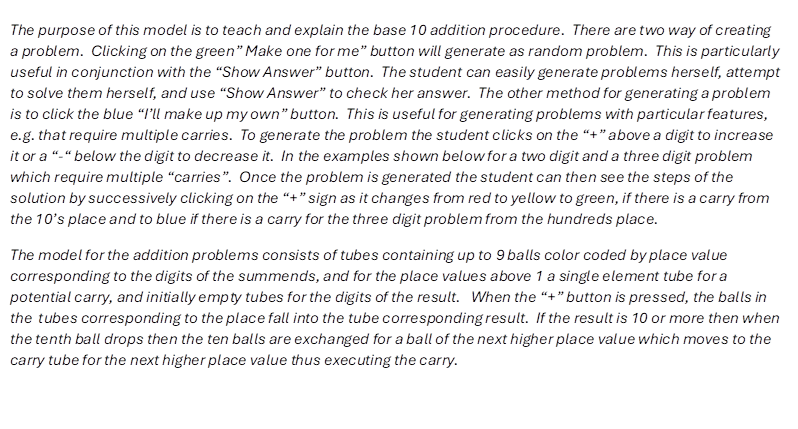
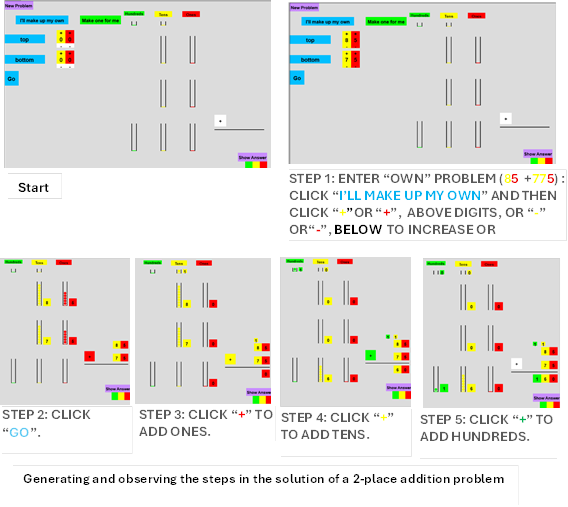
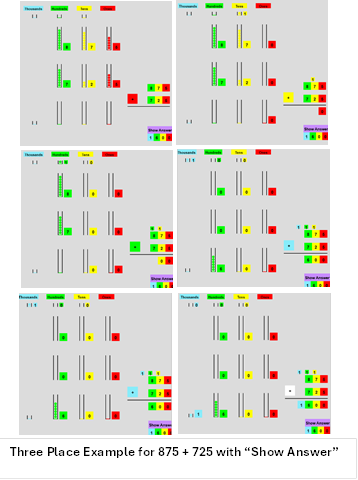
The purpose of this model is to teach and explain the base 10 addition procedure.  There are two way of creating a problem.  Clicking on the green” Make one for me” button will generate as random problem.  This is particularly useful in conjunction with the “Show Answer” button.  The student can easily generate problems herself, attempt to solve them herself, and use “Show Answer” to check her answer.  The other method for generating a problem is to click the blue “I’ll make up my own” button.  This is useful for generating problems with particular features, e.g. that require multiple carries.  To generate the problem the student clicks on the “+” above a digit to increase it or a “-“ below the digit to decrease it.  In the examples shown below for a two digit and a three digit problem which require multiple “carries”.  Once the problem is generated the student can then see the steps of the solution by successively clicking on the “+” sign as it changes from red to yellow to green, if there is a carry from the 10’s place and to blue if there is a carry for the three digit problem from the hundreds place. 
The model for the addition problems consists of tubes containing up to 9 balls color coded by place value corresponding to the digits of the summends, and for the place values above 1 a single element tube for a potential carry, and initially empty tubes for the digits of the result.   When the “+” button is pressed, the balls in the  tubes corresponding to the place fall into the tube corresponding result.  If the result is 10 or more then when the tenth ball drops then the ten balls are exchanged for a ball of the next higher place value which moves to the carry tube for the next higher place value thus executing the carry.


Two Place Addition


Three Place Addition